ZFS RAID is not like traditional RAID. Its on-disk structure is far more complex than that of a traditional RAID implementation. This complexity is driven by the wide array of data protection features ZFS offers. Because its on-disk structure is so complex, predicting how much usable capacity you'll get from a set of hard disks given a vdev layout is surprisingly difficult. There are layers of overhead that need to be understood and accounted for to get a reasonably accurate estimate. I've found that the best way to get my head wrapped around ZFS allocation overhead is to step through an example.
We'll start by picking a less-than-ideal RAIDZ vdev layout so we can see the impact of all the various forms of ZFS overhead. Once we understand RAIDZ, understanding mirrored and striped vdevs will be simple. The process for calculating dRAID capacity adds a bit of complexity, but we'll cover that below.
This example will use 14x 18TB drives in two 7-wide RAIDZ2 (7wZ2) vdevs. It will generally be easier for us to work in bytes so we don't have to worry about conversion between TB and TiB.
Starting with the capacity of the individual drives, we'll subtract the size of the swap partition. The swap partition acts as an extension of the system's physical memory pool. If a running process needs more memory than is currently available, the system can unload some of its in-memory data onto the swap space. By default, TrueNAS CORE creates a 2GiB swap partition on every disk in the data pool. Other distributions may create a large or smaller swap partition or might not create one at all.
18 * 1000^4 - 2 * 1024^3 = 17997852516352 bytes
Next, we want to account for reserved sectors at the start of the disk. The layout and size of these reserved sectors will depend on your operating system and partition scheme, but we'll use FreeBSD and GPT for this example because that is what's used by TrueNAS CORE and Enterprise. We can check sector alignment by running
root@truenas[~]# gpart list da1
Geom name: da1
modified: false
state: OK
fwheads: 255
fwsectors: 63
last: 35156249959
first: 40
entries: 128
scheme: GPT
Providers:
1. Name: da1p1
Mediasize: 2147483648 (2.0G)
Sectorsize: 512
Stripesize: 0
Stripeoffset: 65536
Mode: r0w0e0
efimedia: HD(1,GPT,b1c0188e-b098-11ec-89c7-0800275344ce,0x80,0x400000)
rawuuid: b1c0188e-b098-11ec-89c7-0800275344ce
rawtype: 516e7cb5-6ecf-11d6-8ff8-00022d09712b
label: (null)
length: 2147483648
offset: 65536
type: freebsd-swap
index: 1
end: 4194431
start: 128
2. Name: da1p2
Mediasize: 17997852430336 (16T)
Sectorsize: 512
Stripesize: 0
Stripeoffset: 2147549184
Mode: r1w1e2
efimedia: HD(2,GPT,b215c5ef-b098-11ec-89c7-0800275344ce,0x400080,0x82f39cce8)
rawuuid: b215c5ef-b098-11ec-89c7-0800275344ce
rawtype: 516e7cba-6ecf-11d6-8ff8-00022d09712b
label: (null)
length: 17997852430336
offset: 2147549184
type: freebsd-zfs
index: 2
end: 35156249959
start: 4194432
Consumers:
1. Name: da1
Mediasize: 18000000000000 (16T)
Sectorsize: 512
Mode: r1w1e3
We'll first note that the sector size used on this drive is 512 bytes. Also note that the first logical block on this disk is actually sector 40; that means we're losing
The
17997852516352 - 20480 - 65536 = 17997852430336 bytes
Before ZFS does anything with this partition, it rounds its size down to align with a 256KiB block. This rounded-down size is referred to as the
floor(17997852430336 / (256 * 1024)) * 256 * 1024 = 17997852311552 bytes
Inside the physical ZFS volume, we need to account for the special labels added to each disk. ZFS creates 4 copies of a 256KiB vdev label on each disk (2 at the start of the ZFS partition and 2 at the end) plus a 3.5MiB embedded boot loader region. Details on the function of the vdev labels can be found here and details on how the labels are sized and arranged can be found here and in the sections just below this (lines 541 and 548). We subtract this 4.5MiB (
17997852311552 - 4 * 262144 - 3670016 = 17997847592960 bytes
Next up, we need to calculate the allocation size or "
17997847592960 * 7 = 125984933150720 bytes
That's about 114.58 TiB. ZFS takes this chunk of storage represented by the allocation size and breaks it until smaller, uniformly-sized buckets called "metaslabs". ZFS creates these metaslabs because they're much more manageable than the full vdev size when tracking used and available space via spacemaps. The size of the metaslabs are primarily controlled by the metaslab shift or "
ZFS sets
On the other hand, the "cutoff" for going from
Once we have the value of
2 ^ 34 = 17179869184 bytes
With
floor(125984933150720 / 17179869184) = 7333
This gives us 7,333 metaslabs per vdevs. We can check our progress so far on an actual ZFS system by using the zdb command provided by ZFS. We can check vdev asize and the metaslab shift value by running
root@truenas[~]# zdb -U /data/zfs/zpool.cache -C tank
MOS Configuration:
version: 5000
name: 'tank'
state: 0
txg: 11
pool_guid: 7584042259335681111
errata: 0
hostid: 3601001416
hostname: ''
com.delphix:has_per_vdev_zaps
vdev_children: 2
vdev_tree:
type: 'root'
id: 0
guid: 7584042259335681111
create_txg: 4
children[0]:
type: 'raidz'
id: 0
guid: 2993118147866813004
nparity: 2
metaslab_array: 268
metaslab_shift: 34
ashift: 12
asize: 125984933150720
is_log: 0
create_txg: 4
com.delphix:vdev_zap_top: 129
children[0]:
type: 'disk'
... (output truncated) ...
root@truenas[~]# zdb -U /data/zfs/zpool.cache -m tank
Metaslabs:
vdev 0 ms_unflushed_phys object 270
metaslabs 7333 offset spacemap free
--------------- ------------------- --------------- ------------
metaslab 0 offset 0 spacemap 274 free 16.0G
space map object 274:
smp_length = 0x18
smp_alloc = 0x12000
Flush data:
unflushed txg=5
metaslab 1 offset 400000000 spacemap 273 free 16.0G
space map object 273:
smp_length = 0x18
smp_alloc = 0x21000
Flush data:
unflushed txg=6
... (output truncated) ...
To calculate useful space in our vdev, we multiply the metaslab size by the metaslab count. This means that space within the ZFS partition but not covered by one of the metaslabs isn't useful to us and is effectively lost. In theory, by using a smaller
17179869184 * 7333 = 125979980726272 bytes
That's about 114.58 TiB of useful space per vdev. If we multiply that by the quantity of vdevs, we get the ZFS pool size:
125979980726272 * 2 = 251959961452544 bytes
We can confirm this by running
root@truenas[~]# zpool list -p -o name,size,alloc,free tank
NAME SIZE ALLOC FREE
tank 251959961452544 1437696 251959960014848
The
Note that the zpool SIZE value matches what we calculated above. We're going to set this number aside for now and calculate RAIDZ parity and padding. Before we proceed, it will be helpful to review a few ZFS basics including
Hard disks and SSDs divide their space into tiny logical storage buckets called "sectors". A sector is usually 4KiB but could be 512 bytes on older hard drives or 8KiB on some SSDs. A sector represents the smallest read or write a disk can do in a single operation. ZFS tracks disks' sector size as the "
In RAIDZ, the smallest useful write we can make is
To avoid this, ZFS will pad out all writes to RAIDZ vdevs so they're an even multiple of this
Unlike traditional RAID5 and RAID6 implementations, ZFS supports partial-stripe writes. This has a number of important advantages but also presents some implications for space calculation that we'll need to consider. Supporting partial stripe writes means that in our 7wZ2 vdev example, we can support a write of 12 total sectors even though 12 is not an even multiple of our stripe width (7). 12 is evenly divisible by
The last ZFS concept we need to understand here is the
You can read more about ZFS' handling of partial stripe writes and block padding in this article by Matt Ahrens.
Getting back to our capacity example, we have the minimum sector count already calculated above at
128 * 1024 / 4096 = 32 sectors
Our stripe width is 7 disks, so we can figure out how many stripes this 128KiB write will take. Remember, we need 2 parity sectors per stripe, so we divide the 32 sectors by 5 because that's the number of data sectors per stripe:
32 / (7-2) = 6.4
We can visualize how this might look on the disks (P represents a parity sectors, D represents a data sectors):
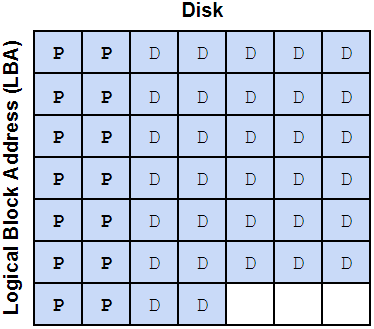
As mentioned above, that partial 0.4 stripe also gets 2 parity sectors, so we have 7 stripes of parity data at 2 parity sectors per stripe, or 14 total parity sectors. We now have 32 data sectors, 14 parity sectors, adding those, we get 46 total sectors for this data block. 46 is not an even multiple of our minimum sector count (3), so we need to add 2 padding sectors. This brings our total sector count to 48: 32 data sectors, 14 parity sectors, and 2 padding sectors.
With the padding sectors included, this is what the full 128KiB block might look like on disk. I've drawn two blocks so you can see how alignment of the second block gets shifted a bit to accommodate the partial stripe we've written. The X's represent the padding sectors.
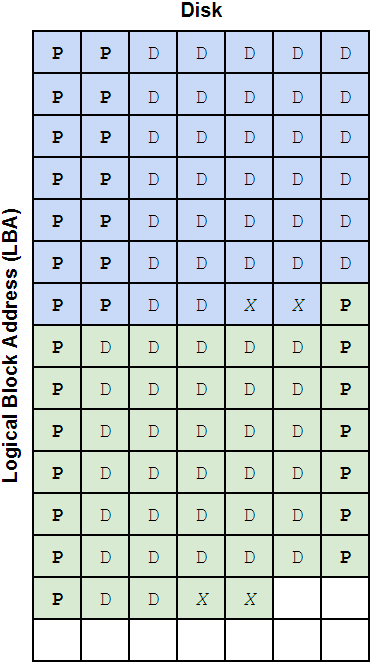
This probably looks kind of weird because we have one parity sector at the start of the second block just hanging out by itself, but even though it's not on the same exact row as the data it's protecting, it's still providing that protection. ZFS knows where that parity data is written so it doesn't really matter what LBA it gets written to, as long as it's on the correct disk.
We can calculate a data storage efficiency ratio by dividing our 32 data sectors by the 48 total sectors it takes to store them on disk with this particular vdev layout.
32 / 48 = 0.66667
ZFS uses something similar to this ratio when allocating space but in order to simplify calculations and avoid multiplication overflows and other weird stuff it tracks this ratio as a fraction of 512. In other words, to more accurately represent how ZFS "sees" the on-disk space, we need to convert the 32/48 fraction to the nearest fraction of 512. We'll need to round down to get a whole number in the numerator (the top part of the fraction). To do this, we calculate:
floor(0.66667 * 512) / 512 = 0.666015625 = 341/512
This 341/512 fraction is called the
251959961452544 * 0.666015625 = 167809271201792 bytes
The last thing we need to account for is SPA slop space. ZFS reserves the last little bit of pool capacity "to ensure the pool doesn't run completely out of space due to unaccounted changes (e.g. to the MOS)". Normally this is 1/32 of the usable pool capacity with a minimum value of 128MiB. OpenZFS 2.0.7 also introduced a maximum limit to slop space of 128GiB (this is good; slop space used to be HUGE on large pools). You can read about SPA slop space reservation here.
For our example pool, slop space would be...
167809271201792 * 1/32 = 5244039725056 bytes
That's 4.77 TiB reserved... again, a TON of space. If we're running OpenZFS 2.0.7 or later, we'll use 128 GiB instead:
167809271201792 - 128 * 1024^3 = 167671832248320 bytes = 156156.5625 GiB = 152.4966 TiB
And there we have it! This is the total usable capacity of a pool of 14x 18TB disks configured in 2x 7wZ2. We can confirm the calculations using
root@truenas[~]# zfs list -p tank
NAME USED AVAIL REFER MOUNTPOINT
tank 1080288 167671831168032 196416 /mnt/tank
As with the
167671831168032 + 1080288 = 167671832248320 bytes = 156156.5625 GiB = 152.4966 TiB
By adding the USED and AVAIL values, we can confirm that our calculation is accurate.
Mirrored vdevs work in a similar way but the vdev
dRAID Capacity Calculation
Capacity calculation for dRAID vdevs is similar to that of RAIDZ but includes a few extra steps. We'll run through an abbreviated example calculation with 2x dRAID2:5d:20c:1s with 8TB disks (no swap space reserved this time).
dRAID still aligns the space on each drive to a 256KiB block size, so we go from 8000000000000 bytes to 7999999967232 bytes per 8TB disk:
floor(8000000000000 / (256 * 1024)) * 256 * 1024 = 7999999967232 bytes
From there, we reserve space for the on-disk ZFS labels (just like in RAIDZ) but we also reserve an extra 32MiB for dRAID reflow space which is used when expanding a dRAID vdev. Details on the reflow reserve space can be found here.
7999999967232 - (256 * 1024 * 4) - (7 * 2^19) - 2^25 = 7999961694208 bytes
dRAID does not support partial stripe writes so we go through several extra alignment operations to make sure our capacity is an even multiple of the group width. Group width in dRAID is defined as the number of data disks in the configuration plus the number of parity disks. For our configuration, that's
7 * 16 * 1024^2 = 117440512 bytes
First we align the individual disk's allocatable size to the row height (again, always 16 MiB):
floor(7999961694208 / (16 * 1024^2)) * 16 * 1024^2 = 7999947014144 bytes
To get the total allocatable capacity, we multiply this by the number of child disks minus the number of spare disks in the vdev:
7999947014144 * (20 - 1) = 151998993268736 bytes
And then this number is aligned to the group size which we calculated above:
floor(151998993268736 / 117440512) * 117440512 = 151998909382656 bytes
This is the allocatable size (or asize) of each of our two dRAID vdevs. We go through the same logic as RAIDZ used to determine the metaslab count but each metaslab gets its size adjusted so its starting offset and its overall size lines up with the minimum allocation size. The minimum allocation size is the group width times the sector size (or
7 * 2^12 = 28672 bytes
This represents the smallest write operation we can make do our layout. To align the metaslabs, ZFS iterates over each one, rounds the starting offset up to align with the minimum allocation size, then rounds the total size of the metaslab down so its evenly divisible by the minimum allocation size. Detail on dRAID's metaslab initialization process can be found here and the code for the process is simplified and mocked up below:
group_alloc_size = group_width * 2^ashift
vdev_raw_size = 0
ms_base_size = 2^ms_shift
ms_count = floor(vdev_asize / ms_base_size)
new_ms_size = []
for (i = 0; i < ms_count; i++)
{
ms_start = i * ms_base_size
new_ms_start = ceil(ms_start / group_alloc_size) * group_alloc_size
alignment_loss = new_ms_start - ms_start
new_ms_size[i] =
floor((ms_base_size - alignment_loss) / group_alloc_size) * group_alloc_size
overall_loss = ms_base_size - new_ms_size[i]
vdev_raw_size += new_ms_size[i]
}
Each metaslab will get a bit of space trimmed off its head and/or its tail. The table below shows the results from the first 20 iterations of the above loop:
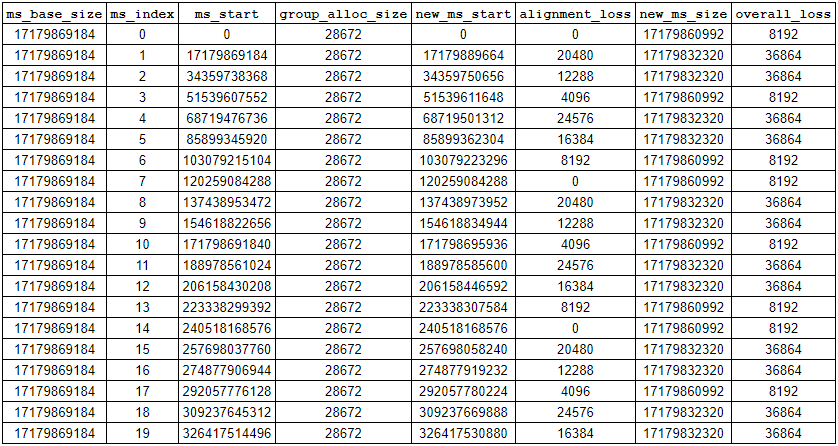
As you can see, we'll end up with some lost space in between many of the metaslabs but it's not very much (at worst, a few gigabytes for multi-PB sized pool). You'll also notice that the metaslab size isn't uniform across the pool; that makes it very hard (maybe impossible) to write a simple, closed-form equation for
If you're inclined, you can validate this non-uniform metaslab sizing using
As a side note, we could theoretically shift the first metaslab's offset to align with the minimum allocation size and then size it down so its overall size was an even multiple of the minimum allocation size and all subsequent metaslabs (each sized down uniformly to be an even multiple of the min alloc size) would naturally line up where they needed to with no gaps in between. In order to do this, however, the OpenZFS developers would need to add dRAID specific logic to higher-level functions in the code; they opted to keep it simple. The amount of usable space lost to those gaps between the shifted metaslabs really is negligible though, like on the order of 0.00004% of overall pool space.
Once we have the
We start with the recordsize (which we'll assume is the default 128KiB) and figure out how many sectors (each sized at
128 * 1024 / 2^12 = 32 sectors
Then we figure out how many redundancy groups this will fill by dividing it by the number of data disks per redundancy group (not the total group width, just the data disks; parity disks don't store data!):
32 / 5 = 6.4
We can't fill a partial redundancy group so we round up to 7. We then multiply this by the redundancy group width (including parity) to get the total number of sectors it takes to store the 128KiB block:
7 * 7 = 49
This configuration consumes 49 total sectors to store 32 sectors worth of data, giving us a ratio of
32 / 49 = 0.6531...
Just like with RAIDZ, we round this down to be a whole fraction of 512 to get the deflate ratio:
floor( (32 / 49) * 512 ) / 512 = 0.6523...
We end up with
151990085230592 * 2 * 334/512 = 198299564324288 bytes
We compute slop space the same as we did above (we exceed the max here so we use 128 GiB) and remove that from our usable space to get final, total usable for this pool:
198299564324288 - (128 * 1024^3) = 198162125370816 bytes
We can validate this with
jfr@zfsdev:~$ sudo zfs list -p tank
NAME USED AVAIL REFER MOUNTPOINT
tank 4545072 198162120825744 448896 /tank
By adding the values in
4545072 + 198162120825744 = 198162125370816 bytes = 184552.86 GiB = 180.23 TiB
Closing Thoughts
The RAIDZ example used VirtualBox with virtual 18TB disks that hold exactly 18,000,000,000,000 bytes. Real disks won't have such an exact physical capacity; the 8TB disks in my TrueNAS system hold 8,001,563,222,016 bytes. If you run through these calculations on a real system with physical disks, I recommend checking the exact disk and partition capacity using
We took a shortcut with the dRAID example because we didn't need to include swap space. We used
sudo truncate -s 8TB /var/tmp/disk{0..39}
/sbin/losetup -b 4096 -f /var/tmp/disk{0..39}
zpool create tank -o ashift=12 draid2:5d:20c:1s /dev/loop{0..19} draid2:5d:20c:1s /dev/loop{20..39}
It's worth noting that none of these calculations factor in any data compression. The effect of compression on storage capacity is almost impossible to predict without running your data through the compression algorithm you intend to use. At iX, we typically see between 1.2:1 and 1.6:1 reduction assuming the data is compressible in the first place. Compression in ZFS is done per-block and will either shrink the block size a bit (if the block is smaller than the recordsize) or increase the amount of data in the block (if the block is equal to the recordsize).
We're also ignoring the effect that variable block sizes will have on functional pool capacity. We used a 128 KiB block because that's the ZFS default and what it uses for available capacity calculations, but (as discussed above) ZFS may use a different block size for different data. A different block size will change the ratio of data sectors to parity+padding sectors so overall storage efficiency might change. The calculator above includes the ability to set a recordsize value and calculate capacity based on a pool full of blocks that size. You can experiment with different recordsize values to see its effects on efficiency. Changing a dataset's recordsize value will have effects on performance as well, so read up on it before tinkering. You can find a good high-level discussion of recordsize tuning here, a more detailed technical discussion here, and a great generalized workload tuning guide here on the OpenZFS docs page.
Please feel free to get in touch with questions or if you spot any errors! jason@jro.io
If you're interested in how the pool annual failure rate values are derived, I have a write-up on that here.